TL;DR (Executive Summary) The era of manual, single-turn AI prompting is ending. Engineering teams are now shifting toward “designing loops”—autonomous cycles where AI agents repeat specific tasks until a definitive stop condition is met. Outlined by the Claude Code team, understanding the four core loop architectures (Turn-based, Goal-based, Time-based, and Proactive) allows developers to automate complex verification processes, manage API token usage efficiently, and scale AI output without sacrificing code quality.
The Paradigm Shift: From Prompts to Loops
If you spend time in developer circles on X, you will notice a distinct shift in how top-tier engineers interact with AI. They are no longer focused on crafting the perfect prompt; they are building autonomous environments.
In the context of Claude Code, a loop is defined as an agent repeating cycles of work until a specific stop condition is triggered. Not all tasks require complex loops, but knowing which primitive to use—based on how they trigger, how they stop, and what tasks they suit best—is the difference between renting an AI and employing one.
Here is the breakdown of the four main loop architectures you need to deploy.
1. The Turn-Based Loop: Manual Trigger, AI Judgment
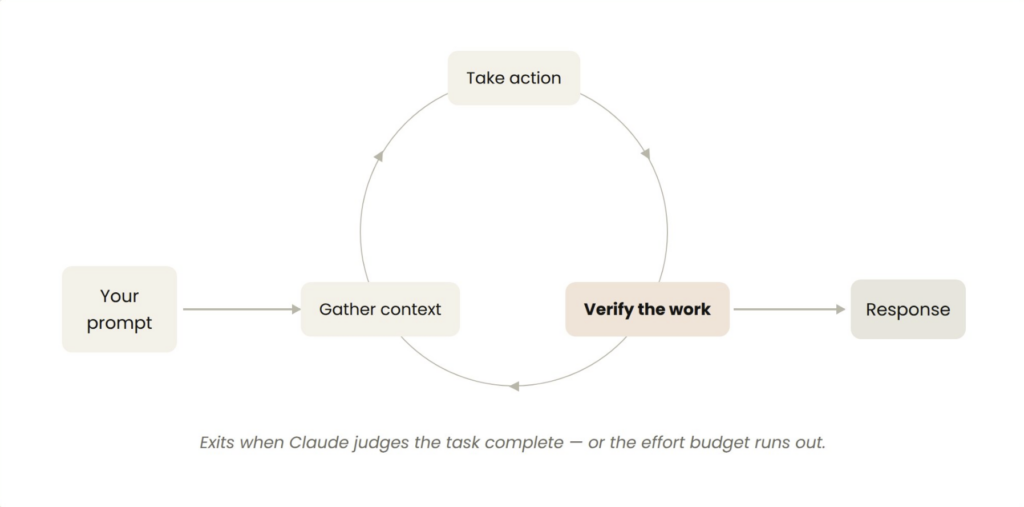
Triggered by: A direct user prompt.
Stop criteria: Claude determines the task is complete or requires human context.
Best for: Ad-hoc, shorter tasks outside of a regular schedule.
Every prompt you send initiates a manual loop. Claude gathers context, takes action, checks its work, and hands it back. However, the secret to optimizing this loop is improving the verification step by encoding your manual checks into a SKILL.md file.
Instead of trusting the model’s first draft, a custom skill forces the AI to check its own work quantitatively. For example, a UI verification skill might look like this:
Markdown
---
name: verify-frontend-change
description: Verify any UI change end-to-end before declaring it done.
---
# Verifying frontend changes
1. Start the dev server and open the edited page in the browser.
2. Interact with the change directly... confirm the expected state change, and screenshot before/after.
3. Check the browser console: zero new errors or warnings.
4. Run a performance trace and audit Core Web Vitals.
If any step fails, fix the issue and rerun from step 1.
2. The Goal-Based Loop (/goal): Iteration with Exit Criteria
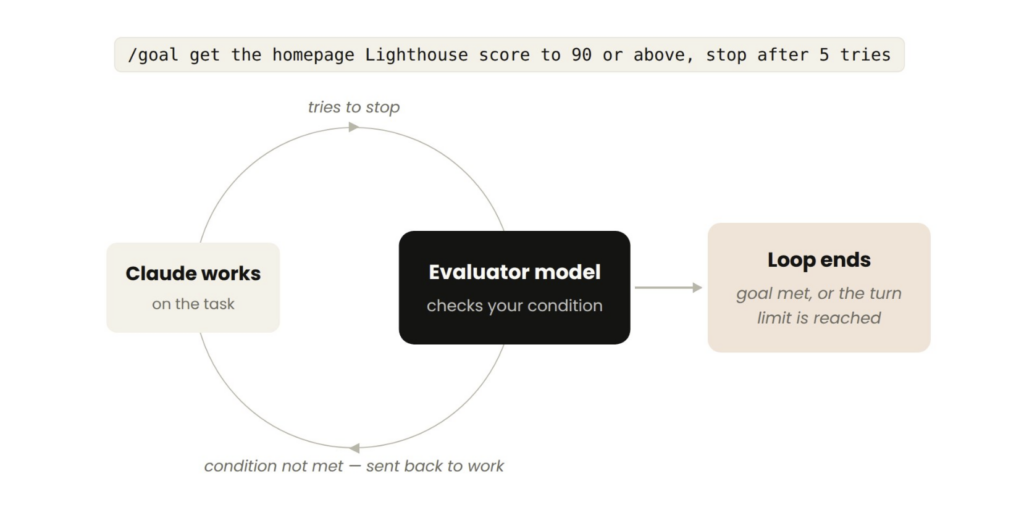
- Triggered by: A manual prompt in real-time.
- Stop criteria: A predefined goal is achieved, OR a maximum turn limit is reached.
- Best for: Complex tasks with verifiable, deterministic exit criteria.
Agents thrive when allowed to iterate. By defining what “done” looks like using the /goal command, Claude doesn’t have to guess if the output is “good enough.” Each time Claude attempts to stop, an evaluator model checks your specific condition and forces the agent back to work if it falls short.
Execution Example:
Bash
/goal get the homepage Lighthouse score to 90 or above, stop after 5 tries.
Time-Based & Proactive Loops: The Autonomous Workforce
When work is recurring and well-defined, human intervention becomes the bottleneck. This is where automated intervals take over.
Time-Based Loops (/loop and /schedule)
- Triggered by: A specified time interval.
- Best for: Checking external systems (e.g., CI pipelines, PR code reviews).
- Example:
/loop 5m check my PR, address review comments, and fix failing CI
Proactive Loops (Dynamic Workflows)
- Triggered by: An event or schedule, entirely headless (no human in real-time).
- Best for: Continuous triage, migrations, or dependency upgrades.
- How it works: You can combine commands to create a self-sustaining system. For instance, using
/scheduleto monitor a Slack channel for bugs, setting a/goalto ensure every bug is triaged, and utilizing Dynamic Workflows to spawn parallel agents that explore different solutions while an adversarial “judge” agent reviews them.
Managing Token Costs and Code Quality
Building infinite loops can drain your API budget if not properly scoped. To maintain a high ROI on your AI infrastructure:
- Use a Second Agent for Code Reviews: Avoid bias. A reviewer agent with fresh context (via the
/code-reviewskill) is more reliable than the agent that wrote the code. - Pilot Before Scaling: Dynamic workflows can spawn hundreds of subagents. Always test your logic on a small dataset before unleashing it on your entire repository.
- Run Scripts for Deterministic Work: If a task doesn’t require deep reasoning (e.g., filling out a standard PDF form), have the AI run a Python script rather than burning tokens trying to re-derive the logic every time.
Getting Started: Choose Your Hand-Off
Look at your current workflow and identify where you are the bottleneck.
- Exploring ideas? Use Turn-based + Custom Skills.
- Have clear completion metrics? Use /goal.
- Monitoring external platforms? Use /schedule.
Stop prompting. Start designing loops.
Official Documentation & References:
Claude Code: Dynamic Workflows & Subagents